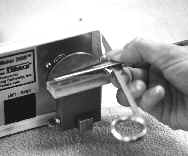
 Scissors:
It is easy to sharpen scissors using the side driver and the scissors guide. Simply
place the scissor flat on the guide and pull across the hone a few times. The guide
is set at a 10% angle which is the angle for most types of scissors. You can also
use the tops disk drivers and the flex shaft attachments for special types of
scissors.
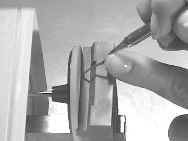 Dental
scalers and curettes:
Dental
scalers and curettes:
The side driver also includes an angle guide for dental scalers and curettes. Two
angle rest are on the guide. One is for scalers and universal curettes, and one is
for gracey curettes. Simple line up the terminal shank on the guide and slide across
the hone into the rotating disk.
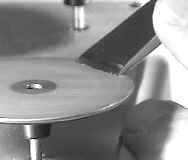 Osteotomes
& Chisels:
Osteotomes
& Chisels:
Simply position on outer edge of honing disk, activate machine with foot pedal, and work
the osteotome in and out and both sides. The bench stone is
also used to square the edge and produce even bevels.
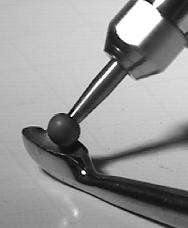 Flex Shaft Kit:
This kit comes in handy when sharpening rongeurs, surgical curettes, punches, reamers,
rasps, etc. All you need is the right attachment to fit into the hard to reach
spot. The kit comes with a cone, disk, and balls in 5 different sizes, (all in 325
grit diamond).
Pictured is the flex shaft with a diamond ball sharpening a bone curette.
 The
Accessories kit is used for repairs such as forceps alignment, joint repairs, testing,
etc.
The
Accessories kit is used for repairs such as forceps alignment, joint repairs, testing,
etc.
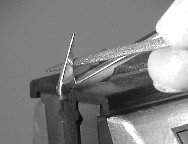
Here we show a surgical scissors being re-serrated. Simply lock the scissor in
the Swivel Vise and use the diamond needle file to serrate the edge.
Please contact a TSharp representative to learn more about our EdgeMaker2000 Surgical
Sharpening System. Thank you.
Click here to return to the Surgical Equipment
Page
Tsharp, The Sharpening
Company, Inc. 3702 W. Sample Street, Suite 1105, South Bend, IN. 46619
phone: 877-487-4277 email:
info@tsharp.com
Dental Instrument Sharpening, Dental Instrument Retipping, New Dental
Instruments, Orthodontic Instrument Sharpening, Orthodontic Instrument
Retipping, Orthodontic Instrument Repair, Medical Instrument
Sharpening, Medical Instrument Retipping, Medical Instrument Repair,
Surgical Instrument Sharpening, Surgical Instrument Retipping, Surgical
Instrument Repair, Beautician Scissor & Shear Sharpening, Nipper Sharpening,
Veterinarian Instrument Sharpening, High Speed Handpiece Repair, Slow Speed
Handpiece Repair, Dental Sharpening Equipment, Orthodontic Sharpening Equipment,
Beautician Sharpening Equipment, Handpiece Repair Equipment, Retipping Supplies,
Retipping Equipment, Repair Supplies, Hands on Training, Training DVD'S,
Training Manuals.